Supplier payments
This page is for people your administrator has given access to supplier payments in Payables. Approving a payment needs a second person: never the one who prepared it.
A supplier payment records money going out to a supplier and says which posted invoices it settles. Open Payables → Supplier payments.
The Supplier payments list
Section titled “The Supplier payments list”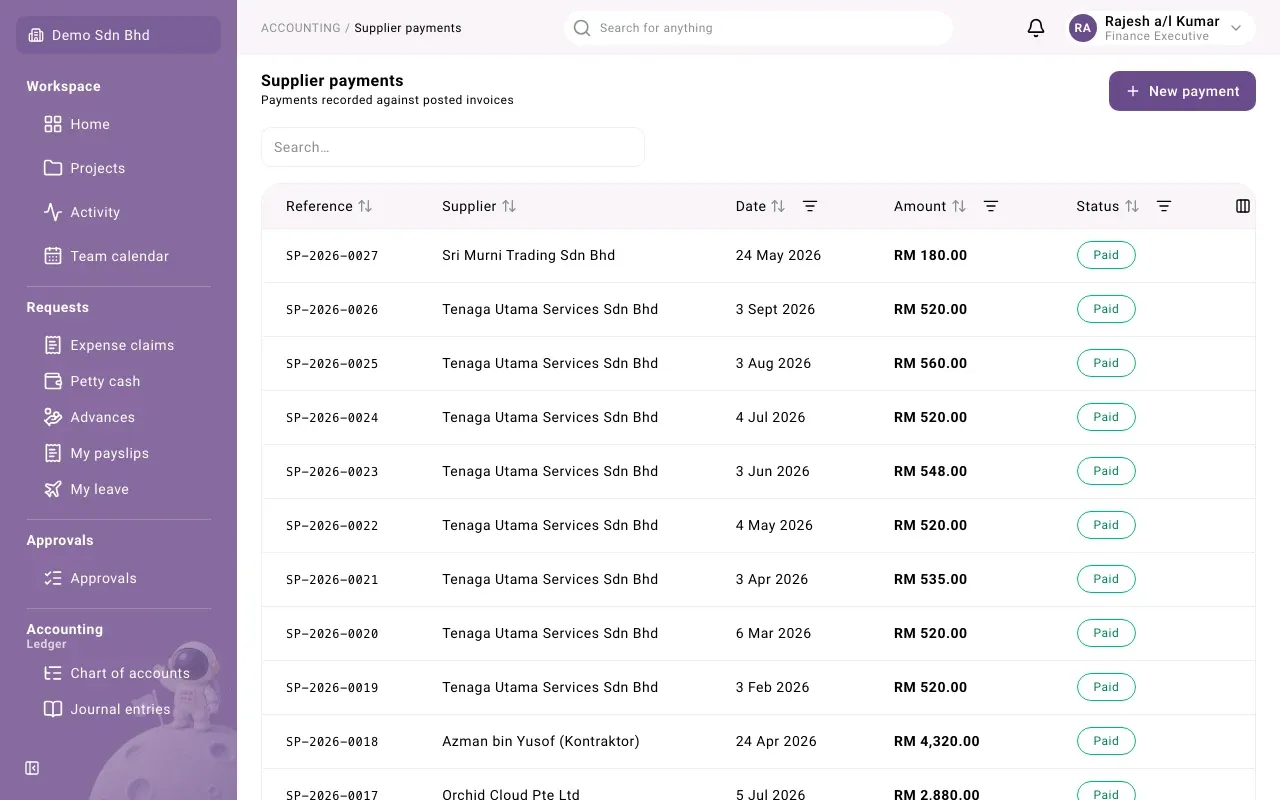
Each row shows the Reference (SP-…), Supplier, Date, Amount and Status. Search, or sort and filter by Date, Amount and Status from the column headings. Load more fetches the next page.
Record a payment
Section titled “Record a payment”-
Select New payment.
-
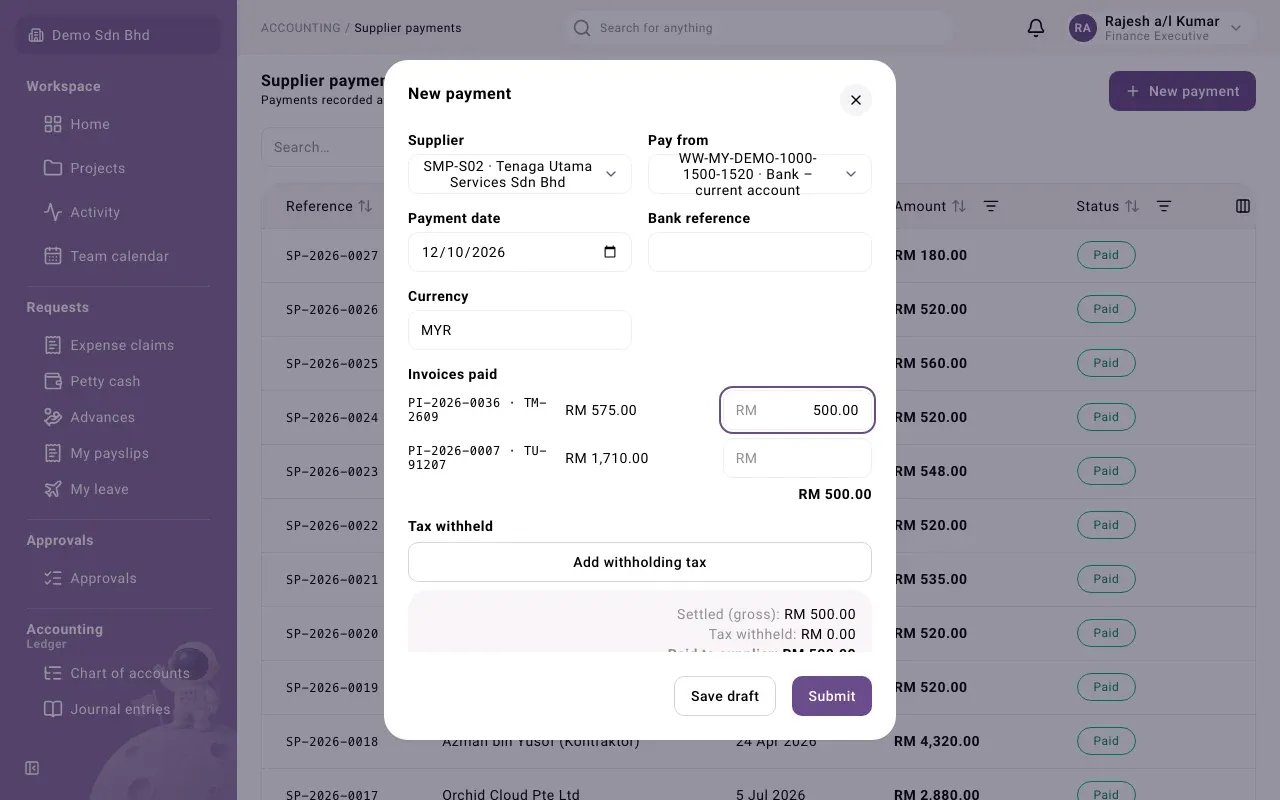
Fill in the top of the form:
Field What to enter Supplier Who you are paying. Inactive suppliers are listed with (Inactive) so their open invoices can still be paid. Pay from The bank account the money leaves Payment date The date the money leaves. It cannot be after today when you submit. Bank reference The bank’s reference for the transfer, if you have it Currency The currency of the invoices you are paying Exchange rate to MYR Only for a foreign currency (the label names your base currency) -
Under Invoices paid, every posted invoice of that supplier still outstanding in that currency is listed with what is outstanding. In the box beside each invoice you pay, enter the amount you are paying. You can pay part of an invoice. The total shows underneath.
-
If tax must be withheld, see Withholding tax on a payment below.
-
Add any Attachments, such as the transfer slip.
-
Select Submit, or Save draft to finish later.
If the supplier has no posted invoices outstanding in the currency you chose, you see “This supplier has no posted invoices outstanding in MYR.” Check the currency, and that the invoice is Posted.
If the supplier’s bank details are not verified, the form warns: “The supplier’s bank details are not verified; the payment cannot be approved until they are.” You can still save and submit it; ask someone to verify the bank details.
Withholding tax on a payment
Section titled “Withholding tax on a payment”Some payments to non-residents need tax withheld and paid to LHDN instead of the supplier. If the supplier has a default withholding code, a row is added for you.
- Under Tax withheld, select Add withholding tax if no row is there.
- Choose the Withholding code and check the Taxable amount (it starts at the total you are paying).
- Withheld shows the tax worked out from the code’s rate.
The summary shows Settled (gross) (what comes off the invoices), Tax withheld and Paid to supplier (what actually leaves the bank). Use Remove to drop a row.
Statuses
Section titled “Statuses”| Status | What it means | What happens next |
|---|---|---|
| Draft | Saved, not sent | Submit it, or Withdraw it |
| Pending approval | Waiting for a second person | They select Approve and record payment, or Reject |
| Paid | Approved; the payment is posted and the invoices it pays are settled | Final, unless voided |
| Rejected | Sent back with a reason | The preparer selects Revise |
| Withdrawn | Dropped before it was submitted | Final |
| Voided | The payment was reversed | Final |
Your administrator can rename or add steps, so yours may differ slightly.
Approve a payment
Section titled “Approve a payment”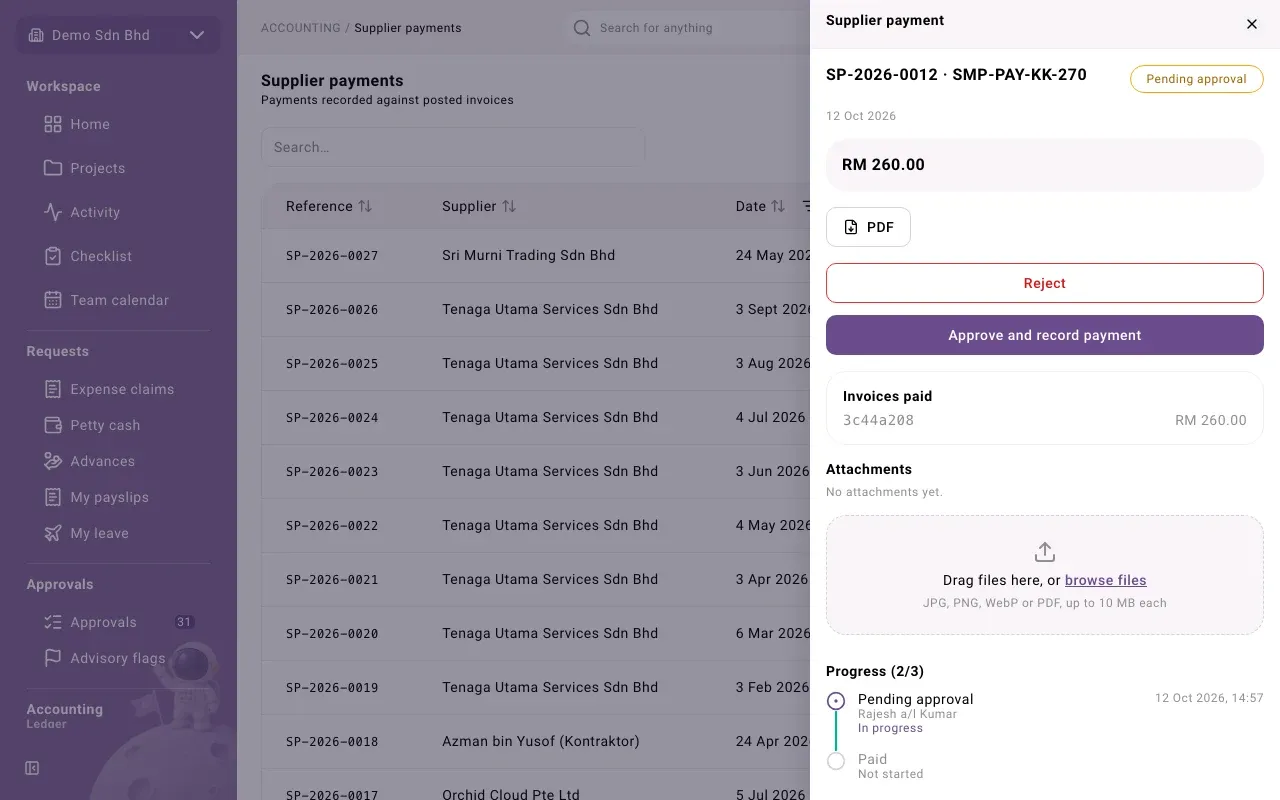
- Open the payment. Check the amount, Invoices paid and any Tax withheld.
- Select Approve and record payment. The status becomes Paid.
You cannot approve a payment you prepared. In an organization with only one member, that person may, with a reason that is recorded as a sole-owner exception.
Payments in a batch
Section titled “Payments in a batch”If you pay by bank file, a submitted payment can be added to a payment batch instead of being approved one by one. The payment then shows In batch PB-…, links to the batch, and has no buttons of its own: it becomes Paid when the batch is marked paid.
The payment panel
Section titled “The payment panel”Opening a payment also shows:
- PDF: downloads a payment advice to send to the supplier
- Invoices paid: the amounts applied, by date
- Tax withheld: each deduction, its taxable amount, when it is Due to LHDN, and its status: Not yet paid (the payment is not approved yet), To remit, In a remittance, Remitted or Exempt (treaty)
- Attachments and Progress, the timeline of who did each step
Problems
Section titled “Problems”| Message | What to do |
|---|---|
| “The supplier’s bank details must be verified before this payment can be approved.” | Have someone verify them on the supplier. |
| “The payment is dated after today. Correct its date before submitting it.” | Change the Payment date. |
| “This payment is in a payment batch. It moves with the batch.” | Work on the batch instead. |
| “Tax withheld on this payment is in a remittance. Withdraw or void the remittance first.” | The withheld tax is already being paid to LHDN; deal with the remittance first. |