Manual journal entries
A manual journal is an entry you write yourself, for adjustments that no document in mcomtask posts for you: accruals, reclassifications, corrections and the like. Only people your administrator has allowed to post manual journals see New manual journal.
Post a manual journal
Section titled “Post a manual journal”- Open Journal entries and select New manual journal.
- Fill in the header and at least two lines.
- Check that the Difference says Balanced.
- Select Post entry. You will see “Posted …” with the entry number, and the new entry opens in the list.
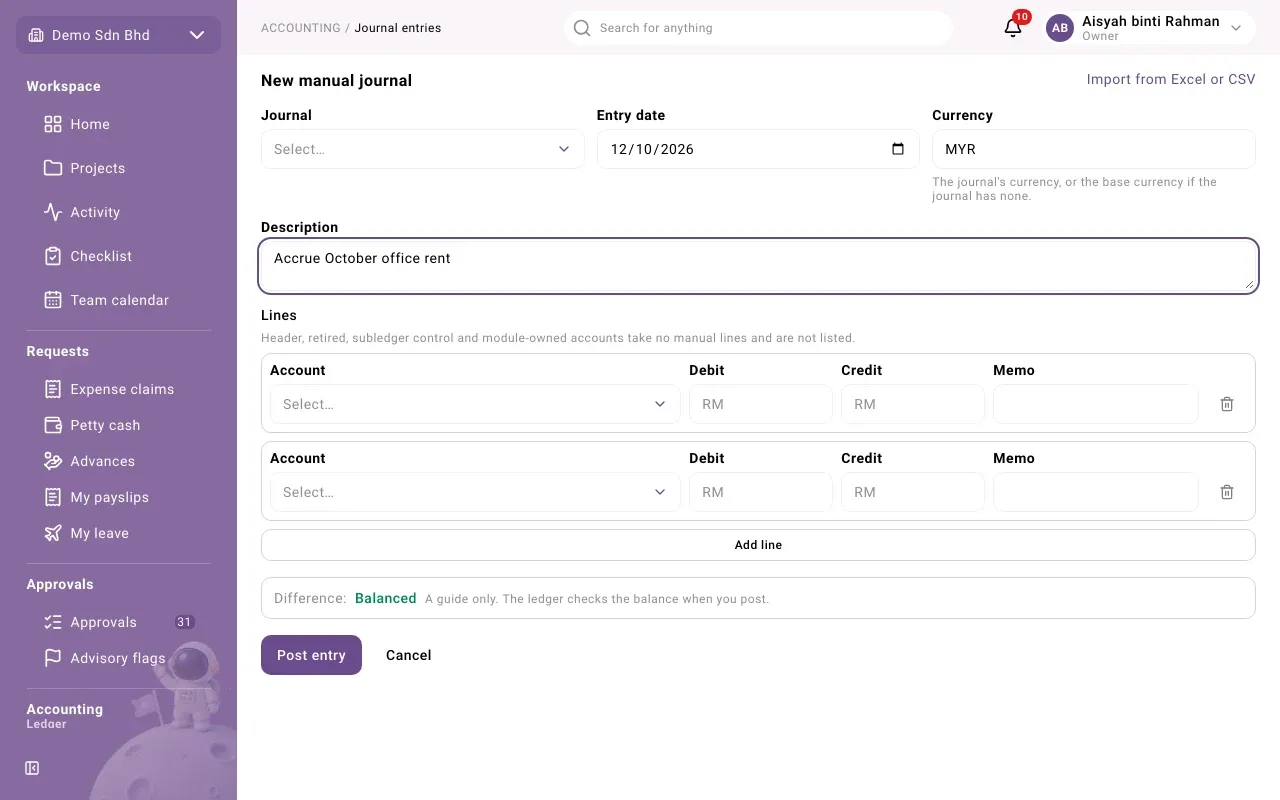
The header
Section titled “The header”| Field | What to enter |
|---|---|
| Journal | The journal to post to. Only active journals are listed. |
| Entry date | The date of the entry. It decides the fiscal period, which must be open. |
| Currency | Filled in for you: the journal’s currency, or your base currency if the journal has none |
| Description | What the entry is for. Journal text is a record: write it in English or Bahasa Malaysia. |
The lines
Section titled “The lines”Each line has:
| Field | What to enter |
|---|---|
| Account | The account the line posts to |
| Debit or Credit | The amount, on one side only, e.g. 1500.00 |
| Memo | Optional note for this line |
| Analytic fields, such as a project | Where your organization uses analytic axes and the account takes one, choose where this line is charged, or None |
Select Add line for more lines. The bin button removes a line; an entry always keeps at least two.
The Account list leaves some accounts out on purpose: “Header, retired, subledger control and module-owned accounts take no manual lines and are not listed.” For example, you cannot post by hand to accounts payable, accounts receivable, employee advances, SST or withholding tax payable, or a petty cash float’s account. Those balances are moved only by their own documents.
The Difference
Section titled “The Difference”Below the lines, Difference shows Balanced, or “Debits exceed credits by …” or “Credits exceed debits by …”. This is a guide only; the ledger checks the balance itself when you post.
When the entry is refused
Section titled “When the entry is refused”If the ledger refuses the entry, the form shows Not posted with the reason, and nothing is posted. Common causes:
- the debits and credits do not balance
- the entry date is in a period that is closed or locked (see Fiscal periods)
A field left empty shows Required under it. Fix the form and select Post entry again. Cancel leaves without posting.
Import journal entries from a file
Section titled “Import journal entries from a file”If you are also allowed to run imports, the form has the link Import from Excel or CSV. It opens the Import page with Journal entries chosen, where you download the template, upload your CSV or Excel file and match its columns. Each file is checked first and saved only if every row is right. The file has one row per journal line; rows that share an entry reference post together as one entry. Each entry names its journal by the journal’s code, so use the codes shown on the Journals page.