Migrating your books
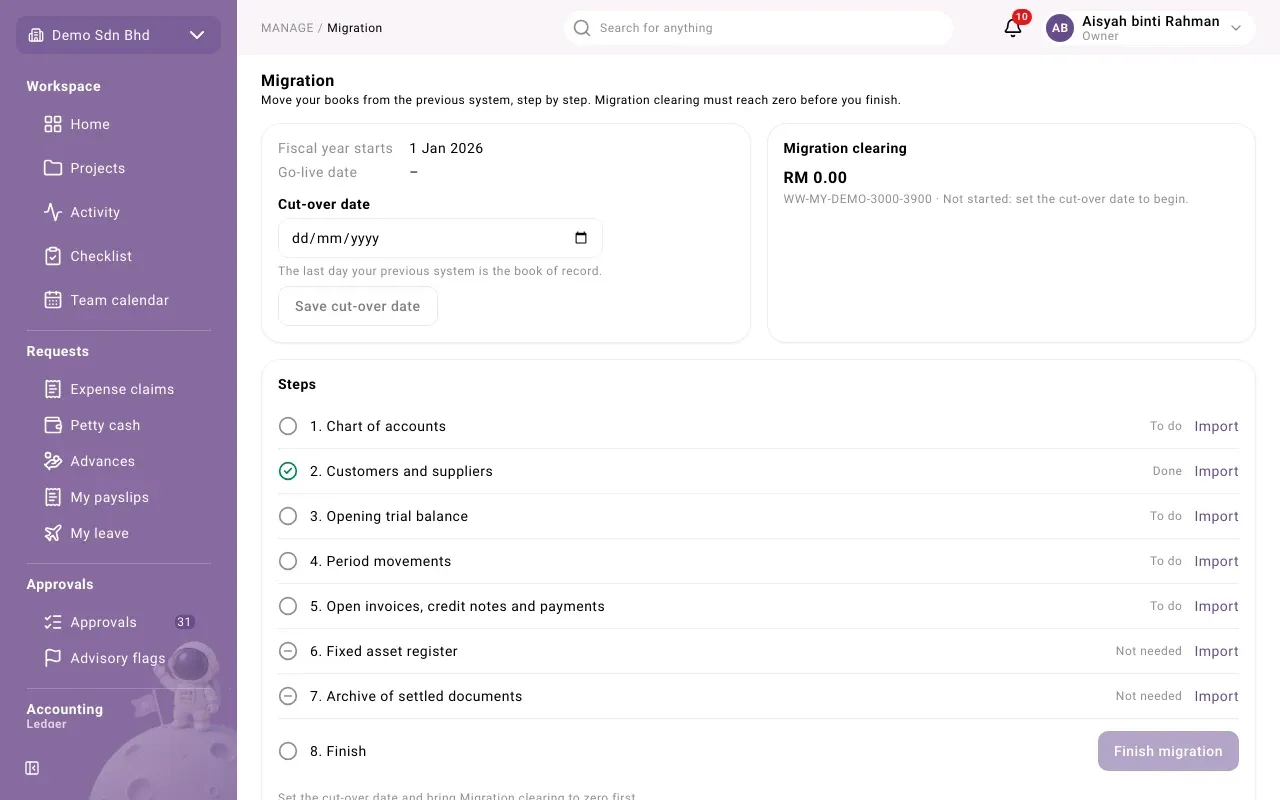
Migration moves your accounting from your previous system into mcomtask, step by step, and proves that what you brought in agrees with the old books. “Migration clearing must reach zero before you finish.”
This page is for the people setting your organization up, with access to imports. You find it under Manage → Data → Migration. Each step sends you to the Import page for the file it needs. Ask your accountant to help you decide the dates and check the figures.
The dates
Section titled “The dates”| Date | Meaning |
|---|---|
| Fiscal year starts | The first day of your first financial year in mcomtask |
| Cut-over date | “The last day your previous system is the book of record.” |
| Go-live date | The first day mcomtask is the book of record: the day after cut-over |
Set the Cut-over date first, then select Save cut-over date. Until you do, Migration clearing reads “Not started: set the cut-over date to begin.”
Migration clearing
Section titled “Migration clearing”Migration clearing is a temporary account that proves the migration balances. Your old trial balance’s receivables and payables go into it, and each open invoice, credit note and payment you import takes its share back out. When everything is in and the old books were consistent, it is exactly zero.
- “Zero: the opening documents agree with the old trial balance.” You can finish.
- “Not zero yet: the opening documents do not yet match the old receivables and payables.” Find the missing or wrong documents.
Nothing else can post to Migration clearing; it moves only through imports. Until the migration is finished, you cannot close your first period while Migration clearing holds a balance. For periods before go-live, the balance sheet shows receivables and payables inside Migration clearing rather than on their own lines.
The steps
Section titled “The steps”Each step shows Done, To do or Not needed, and an Import link to the right import. Work through them in order:
- Chart of accounts
- Customers and suppliers
- Opening trial balance: balances at the end of the year before Fiscal year starts.
- Period movements: each month from the start of the year to cut-over. Not needed when you go live on the first day of the year.
- Open invoices, credit notes and payments: everything unpaid or unallocated at cut-over.
- Fixed asset register: optional.
- Archive of settled documents: optional. Old settled documents are kept read-only under their original numbers. They are not in the books or any report.
- Finish
A step is Done once a file of its kind has been imported.
Finish the migration
Section titled “Finish the migration”When the cut-over date is set and Migration clearing is zero, select Finish migration and confirm. “No opening balance, period movement or open document can be imported after this, unless the migration is reopened.” The step shows when it was finished.
If the button is unavailable, the page says: “Set the cut-over date and bring Migration clearing to zero first.”
Reopen the migration
Section titled “Reopen the migration”If you find something missing after finishing, select Reopen migration, write the Reason (in English or Bahasa Malaysia) and select Reopen migration. This is refused once a period from go-live onward is closed.
Problems
Section titled “Problems”| Message | What to do |
|---|---|
| “Set the cut-over date first.” | Set and save the Cut-over date. |
| “Migration clearing still holds a balance. …” | Compare your open documents with the old trial balance’s receivables and payables. |
| “The migration is finished. Reopen it to change it.” | Reopen it, with a reason, if you must import more. |
| “A period from go-live onward is closed, so the migration cannot be reopened.” | Talk to your accountant: corrections now go through ordinary entries. |
| “Migration clearing moves only through the data import. Choose another account.” | You tried to post to Migration clearing by hand. Use another account. |