Recording a last day
This page is for HR and administrators who manage employee records. Allowing a last day while something is still open needs owner-level access.
When someone resigns or is let go, you record their last day on their employee record. Until that day passes they show as Serving notice; after it they show as Left.
Record a last day
Section titled “Record a last day”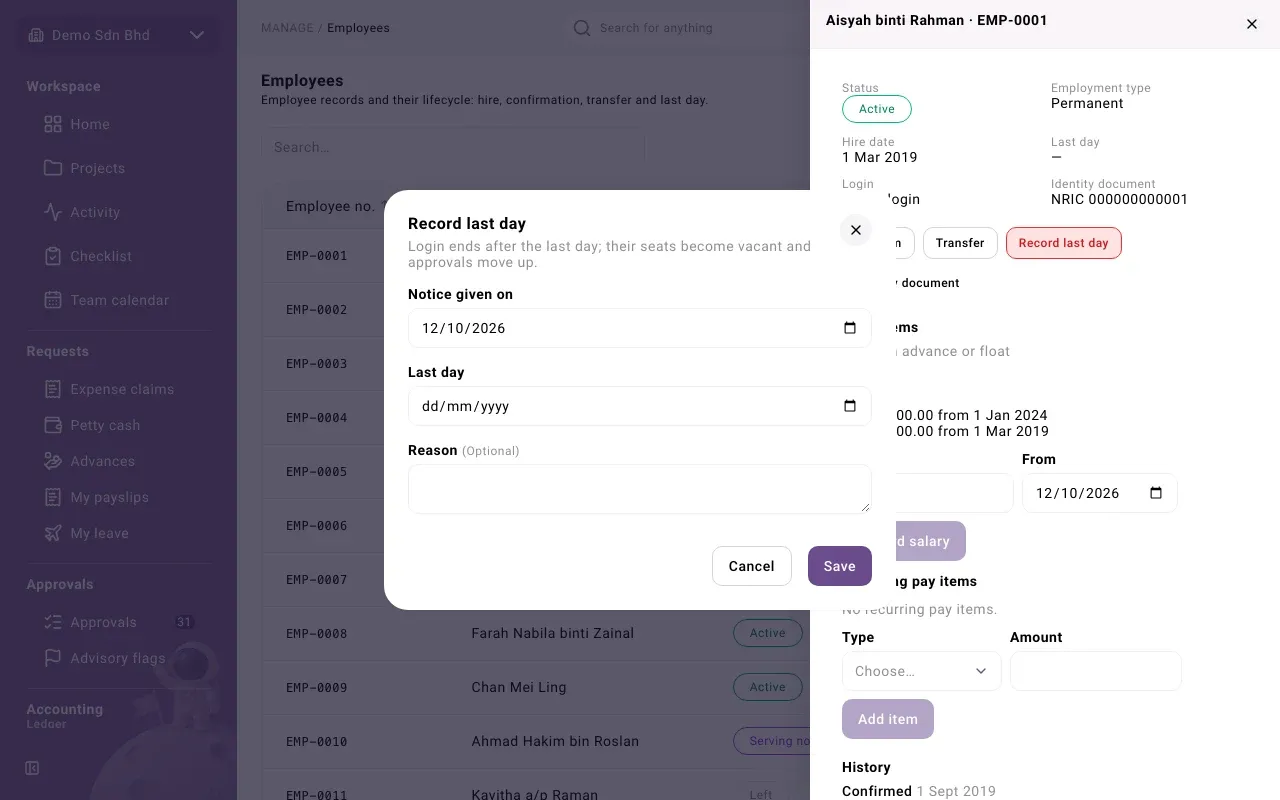
-
Open Employees and select the person.
-
Select Record last day. The dialog explains: “Login ends after the last day; their seats become vacant and approvals move up.”
-
Fill in:
Field What to enter Notice given on The day notice was given Last day Their last working day, on or after the notice date Reason Optional, in English or Bahasa Malaysia -
Select Save. You will see “Last day recorded” and the status changes to Serving notice.
If some of the person’s own documents are still waiting for approval, the dialog says how many and asks you to decide them before the last day.
When an advance or float is still open
Section titled “When an advance or float is still open”The last day cannot be recorded while the person still holds an open advance or a petty cash float. The dialog lists them under “The last day cannot be recorded while these are open:”, for example “Advance ADV-…” or “Petty cash float …”. Ask them to settle the advance and return the float first (see Advances and Petty cash).
If the last day has to be recorded anyway, an Owner other than you can allow it:
- The Owner opens the record. Open items lists what is still open (or says “No open advance or float”).
- They select Allow last day, check the Last day, and give a Reason. The reason is required and kept in the audit trail.
- They select Allow last day. They see “Last day allowed; another member can record it now”.
- Someone else then records the last day as above.
Withdraw notice
Section titled “Withdraw notice”If the person stays on, select Withdraw notice while they are Serving notice. Enter Withdrawn on, a reason if you like, and select Save. You will see “Notice withdrawn”. They are Active again with no last day, and notice can be given again later.
What happens on the last day
Section titled “What happens on the last day”After the last day passes:
- the status becomes Left;
- their login ends, so they can no longer sign in;
- their seats in the org chart become vacant, and approvals that were waiting for them move up to the next person above.
Nothing is deleted. The record, its History and their past documents all stay.
Documents waiting on a reporting line
Section titled “Documents waiting on a reporting line”If the person who left had documents of their own still in progress, the record may show Documents waiting on a reporting line: “These documents of theirs cannot reach an approver because they no longer have a seat. Re-point or reject them.” Each line shows the kind of document, its state and since when. Ask the approvers concerned to deal with them.
Rehire someone who left
Section titled “Rehire someone who left”Open their record and select Record rehire. It works like a hire (see Employee records) and keeps their employee number.
Restore a login
Section titled “Restore a login”If a person is Active or Serving notice but their login has ended, people allowed to invite members see Restore login. Confirm “Restore this person’s login? Their old roles are not restored.” You will see “Login restored. It has no roles; grant them under Roles.” Give them their roles again before they need them. Nobody can restore their own login.
Problems
Section titled “Problems”- “The person still holds an advance or petty cash float…” Settle them, or ask another Owner to allow the last day.
- “You allowed this last day yourself; another member must record it.” Ask someone else to record it.
- “The employee is not currently employed. Record the rehire first.” The person has left; record a rehire before anything else.