Advisory features
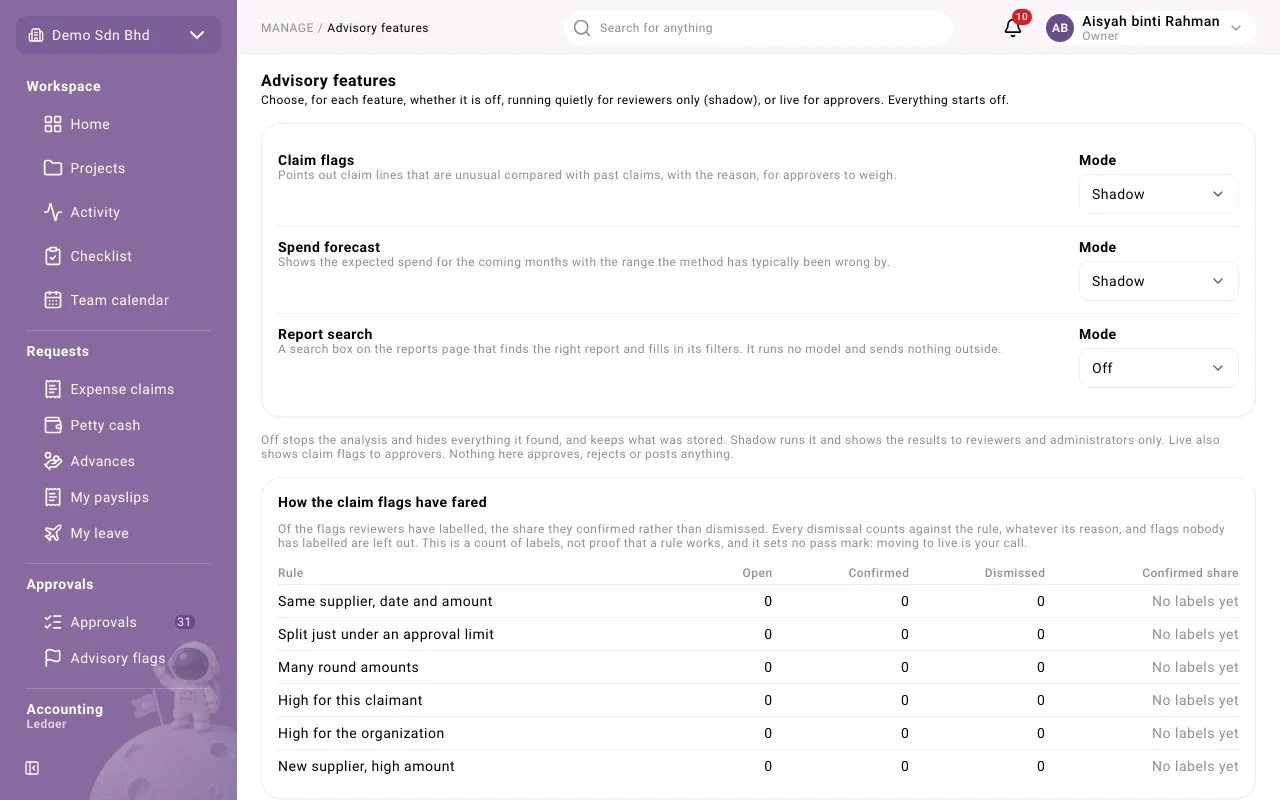
Advisory features are optional helpers that point things out but never decide anything. Open Advisory features under Manage to choose, for each one, whether it is off, running quietly for reviewers only, or live. It is for administrators your organization has given access to these settings. Everything starts Off.
The features
Section titled “The features”| Feature | What it does |
|---|---|
| Claim flags | Points out claim lines that are unusual compared with past claims, with the reason, for approvers to weigh. |
| Spend forecast | Shows the expected spend for the coming months, with the range the method has typically been wrong by. |
| Report search | A search box on the reports page that finds the right report and fills in its filters. It runs no model and sends nothing outside. |
The modes
Section titled “The modes”| Mode | What happens |
|---|---|
| Off | The analysis stops and everything it found is hidden. What was already stored is kept. |
| Shadow | The analysis runs, and the results are shown to reviewers and administrators only. |
| Live | As shadow, and claim flags are also shown to approvers. |
Nothing here approves, rejects or posts anything. A claim flag never blocks, routes or decides a claim: the approver decides.
Change a mode
Section titled “Change a mode”- Find the feature and open its Mode.
- Choose Off, Shadow or Live.
The change is saved straight away. You will see the feature and its new mode, for example “Claim flags: Shadow”.
How the claim flags have fared
Section titled “How the claim flags have fared”If you can review flags, a card below the settings, How the claim flags have fared, shows each Rule with how many flags are Open, Confirmed and Dismissed, and the Confirmed share: of the flags reviewers have labelled, the share they confirmed rather than dismissed. No labels yet means nobody has labelled that rule’s flags.
Keep in mind:
- Every dismissal counts against the rule, whatever its reason.
- Flags nobody has labelled are left out.
- It is a count of labels, not proof that a rule works.
When claim flags are Off, the card says there is nothing to show.
The rules are:
| Rule | It flags |
|---|---|
| Same supplier, date and amount | Lines that look like the same receipt |
| Split just under an approval limit | Spend split into amounts just below a limit |
| Many round amounts | Many round-number amounts |
| High for this claimant | An amount high compared with this person’s past claims |
| High for the organization | An amount high compared with the organization’s past claims |
| New supplier, high amount | A high amount at a supplier not seen before |