Statements, aging and analysis
This page is for people your administrator has given access to Receivables and to Reports. Downloading report files needs permission to export reports, and Invoice analysis needs its own access; if you do not see them, ask your administrator.
All three are built from what is recorded in the books, so they always agree with each other. Drafts never appear in them.
A customer’s statement of account
Section titled “A customer’s statement of account”A statement lists every entry for one customer between two dates, with a running balance. Send it to a customer who asks what they owe.
- Open Customers and select the customer.
- In the side panel, under Statement of account, set From, To and the Currency. It starts at the first of this month, today, and the customer’s currency.
- Read the statement, or download it:
- PDF saves a printable statement;
- Export offers CSV, Excel (XLSX) or PDF.
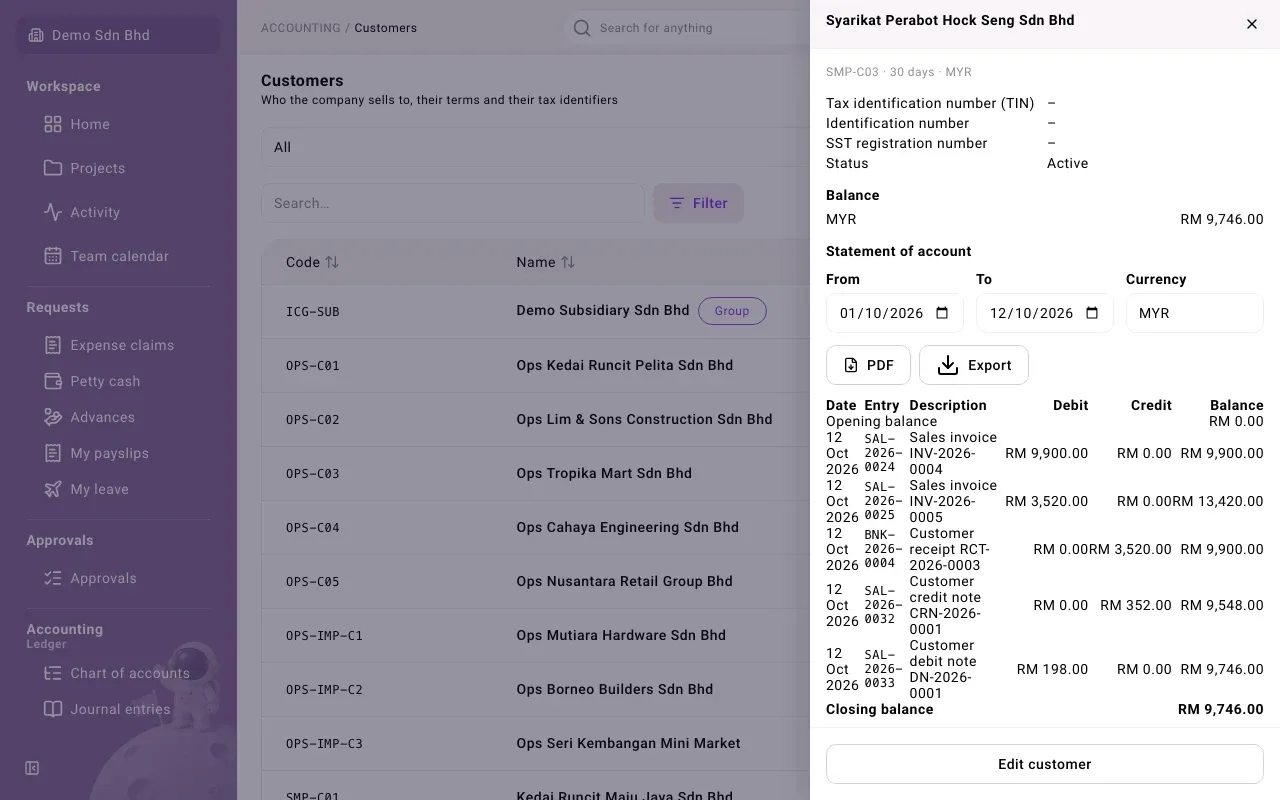
| Column | What it shows |
|---|---|
| Date | The date the entry was recorded in the books. For a receipt this can differ from the date received. |
| Entry | The journal entry number |
| Description | The document, for example “Sales invoice INV-2026-0004” or “Customer receipt RCT-2026-0003” |
| Debit | What the customer was charged: invoices and debit notes |
| Credit | What reduced the debt: receipts and credit notes |
| Balance | The running balance |
The first row is the Opening balance before From, and the last is the Closing balance. Under the table, the closing balance is split by age: Current, 1–30 days, 31–60 days, 61–90 days and Over 90 days. If nothing happened in the range you see “No transactions in this period.”
Balance, above the statement, shows what the customer owes today in each currency.
AR aging
Section titled “AR aging”AR aging shows, for every customer, how much is owed and how overdue it is.
- Open Reports and select the AR aging tab.
- Set As of to the date you want the picture for. It starts at today.
- To narrow it, choose a Customer, or enter Outstanding from and Outstanding up to (for example 1000.00) and press Enter.
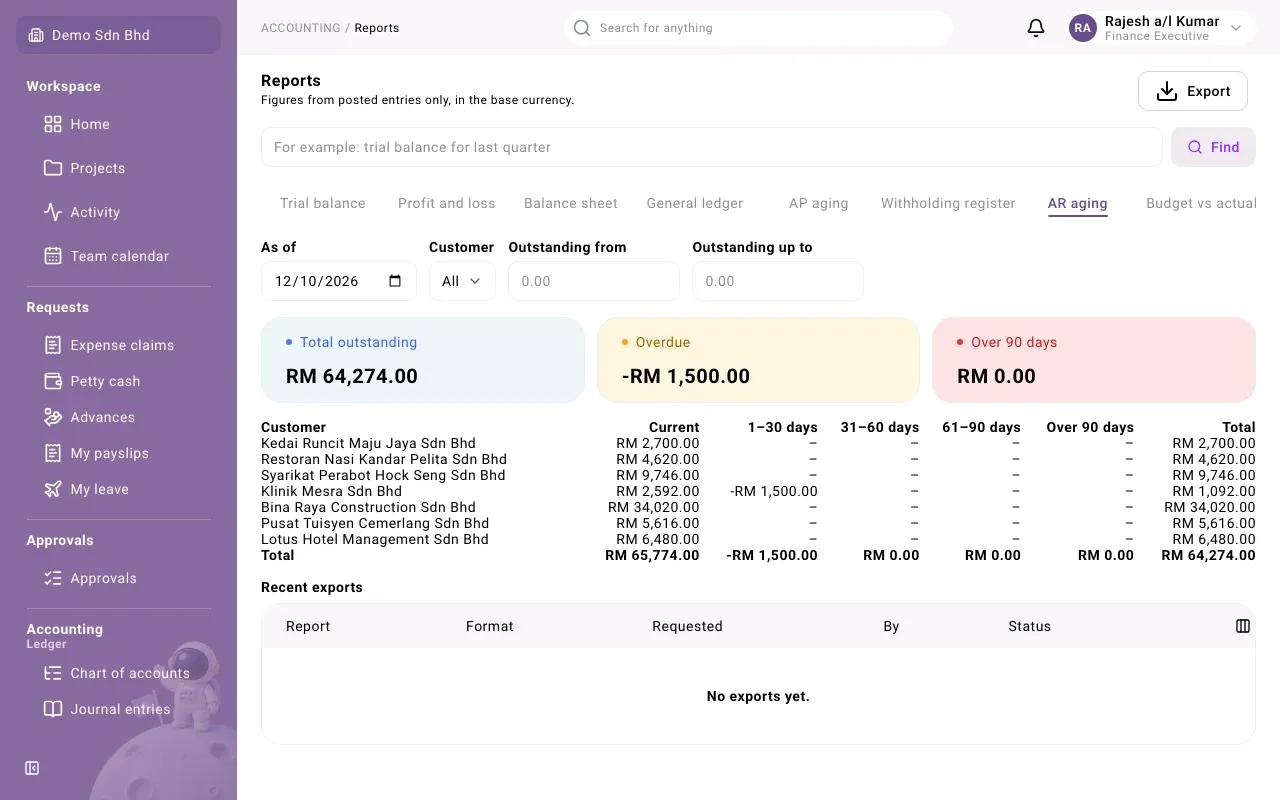
The cards at the top show the Total outstanding, the Overdue amount and what is Over 90 days. Select Total outstanding to go to the sales invoice list.
The table has one row per customer with what they owe in each column: Current (not yet due), 1–30 days, 31–60 days, 61–90 days and Over 90 days past the due date, and the Total. The Total row adds up every customer.
A negative amount is money the customer has paid you that is not applied to an invoice yet, or credit left on a credit note. It is shown in the column for its own date.
If no one owes anything you see “No customer owes anything as of this date.”
To download the aging, select Export at the top of the page and choose CSV, Excel (XLSX) or PDF. Your downloads are listed under Recent exports, where you can Download them again.
Invoice analysis
Section titled “Invoice analysis”Invoice analysis compares what you invoiced with what you collected.
- Open Reports and select the Invoice analysis tab. If you cannot see it, scroll the row of tabs to the right.
- Choose the Year, or All years, and optionally a Month.
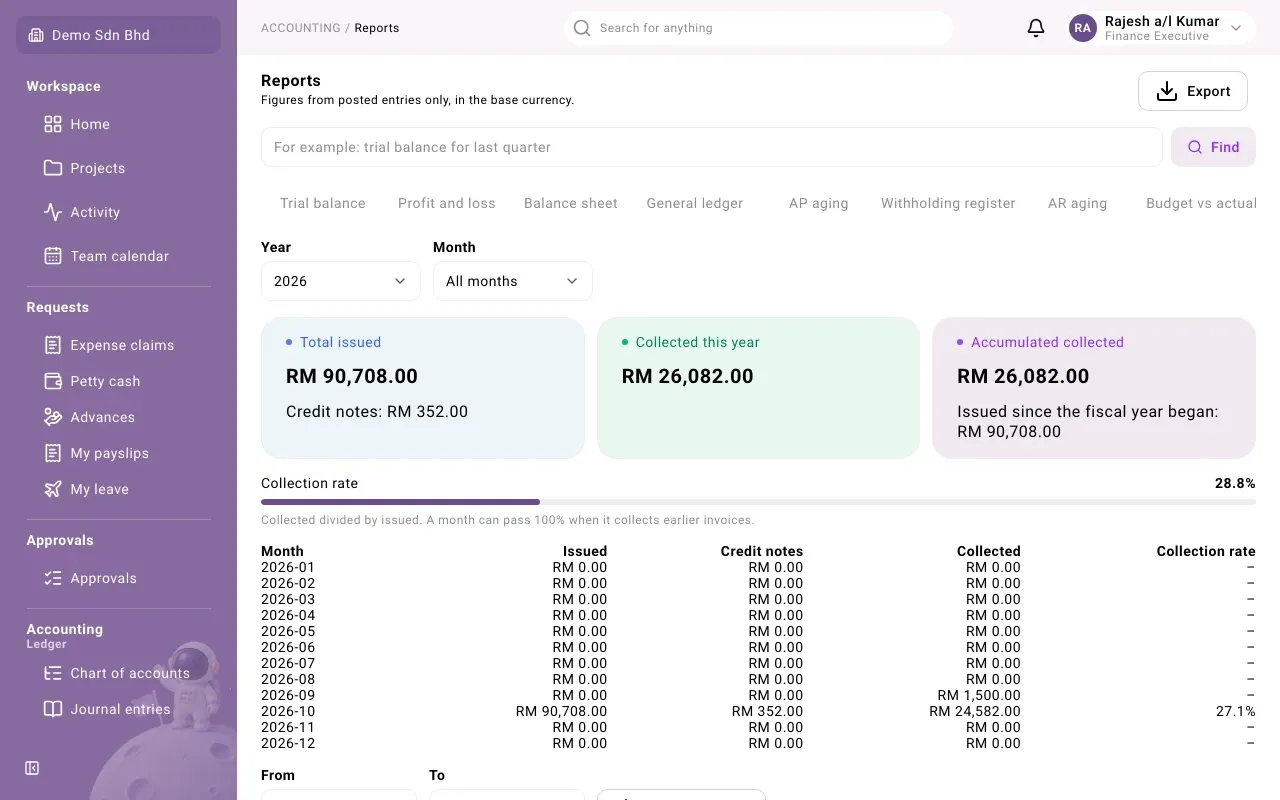
| Figure | What it shows |
|---|---|
| Total issued | What you invoiced in the period, with the Credit notes: issued under it |
| Collected this year / Collected this month / Collected, all years | What customers paid in the period |
| Accumulated collected | What was collected since the fiscal year began, with what was Issued since the fiscal year began: |
| Collection rate | Collected divided by issued |
As the page says, “A month can pass 100% when it collects earlier invoices.” The table below shows Issued, Credit notes, Collected and the Collection rate month by month.
Export invoices
Section titled “Export invoices”At the bottom, set From and To (they start at the whole selected year) and select Export invoices to download the list of invoices issued in that range as CSV, Excel (XLSX) or PDF.
The page’s own Export button downloads the analysis for the chosen year or month. It is not offered for All years.